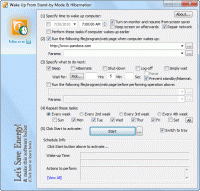
Free, compact and handy utility to wake up PC from a Sleep mode or hibernation at a predefined time. Let's save energy!
Have you ever thought about how much energy your computers use up at night or when they're not in use? Have you ever wondered if it's possible to wake up your system from a Sleep mode (or Hibernation) using a resident program and not waste all that energy?
The answer is yes, it is possible! This simple utility will let you do it. Besides that it can also send your system back into a Sleep mode (hibernate it, power it off, or log-off a user). Moreover, you can also use this utility as a scheduler to run programs without involving a Sleep mode. Our latest feedback shows that this utility could be used for an in-car PC to optimize booting time and to save battery life.
Our carbon footprint grows out of control with each day.
Start small. Let's Save Energy!
Special features:
* Can restore almost every Windows-based Operating System from a Sleep mode (and most systems from hibernation as well).
* Can run a file or open a web page at a predetermined time after a wake-up event, during normal operation, or before performing power operation.
* Can send system back into a Sleep mode (hibernate it, shut it down, or log off user) after a waiting period.
* Can detect if a wake event from a Sleep mode (or hibernation) is supported by your system.
* Can turn your monitor on and hold off screen-saver during a waiting period.
* Can repair local area network and high-speed Internet connections upon waking up from a suspended power state.
* Can send system into a Sleep mode or hibernate it with more options than available through the Operating System.
* Can be incorporated into an in-car (entertainment) PC system to speed up booting time & save battery.
* Can be run from the Windows Command Line without a user interaction.
* Can be saved in a batch file for later use.
* We can customize this utility to better fit the needs of your organization. Whats new in version 1.7.20.3: Made fully compatible with Windows 7, added diagnostic event logging and more. Requirements: IBM PC + Advanced Configuration and Power Interface support Operating system: Windows All Limitations: None Release notes: Major Update
Dotfuscator Professional Edition is a .Net Obfuscator, Compactor and Watermarker that helps protect programs against reverse engineering while making them smaller and more efficient. The .NET obfuscation code protection tool selected by Microsoft.
Price: $1890.00, Rating: 3.39, Downloads: 255 Download
HelpConsole 2010 is powerful web-based help authoring tool for creating Help Systems and PDF documentation for your website or to distribute with your software products.
Price: $299, Rating: 6, Downloads: 136 Download
Using chm2web (chm to html converter) you can convert documentation in the chm format (html help) into a full-featured browser-based platform-independent html help system that can be viewed in any modern web browser.
Price: $19, Rating: 8, Downloads: 98 Download
eTextWizard is an ebook maker: a quick .chm maker help maker and many other text convert tools. Convert html to CHM html help file or ebook. Convert text to CHM html help file or ebook. Convert text to Win help file or ebook.
Price: $49, Rating: 6, Downloads: 83 Download
User Rating
Rating:2.2 out of
5 Based on13 ratings.
13 user reviews.

 WakeupOnStandBy 1.7.20.3 details